
The operating platform for company race participation
Bring colleagues together through running.
OfficeRunClub connects race selection, company places and allocation, employee contribution, relay coordination, organizer registration and follow-up, and a participation overview for the company — in one workflow.
Already taking part? Log in with your work email once your company is set up.
See OfficeRunClub for your companyOne place from race choice to race day
Every step below is part of the product today. The excerpts use demonstration data, not live company data.
Portal excerpts with demonstration data.
Case: Holmenkollstafetten
How a company runs Holmenkollstafetten in OfficeRunClub
The relay is the hardest race to coordinate, so it shows the whole workflow. The same steps apply to a marathon, a city race or any other race in the company portfolio.
- 01
Colleagues choose the race
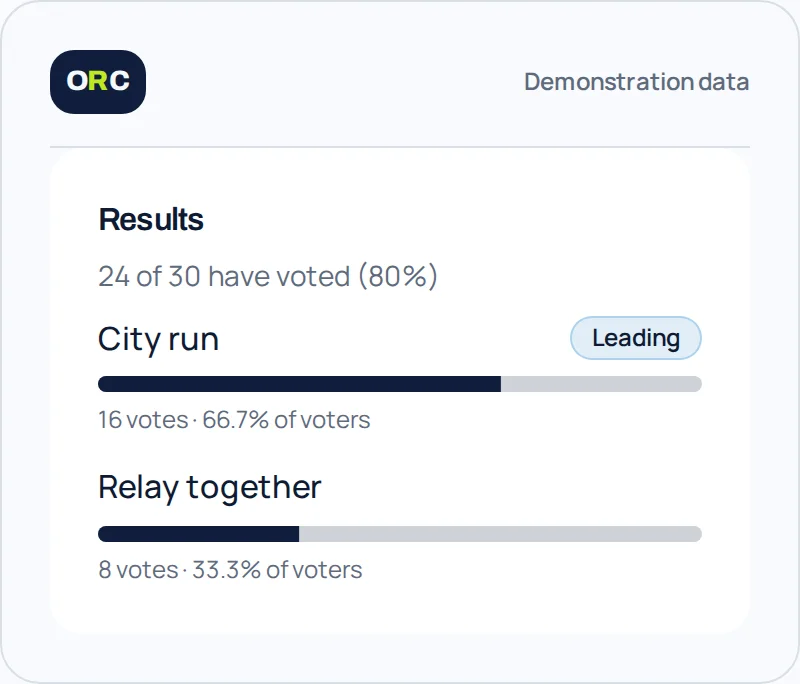
A poll goes out for the 2027 season. Holmenkollstafetten wins, and the company puts it on the programme.
- 02
The team takes shape
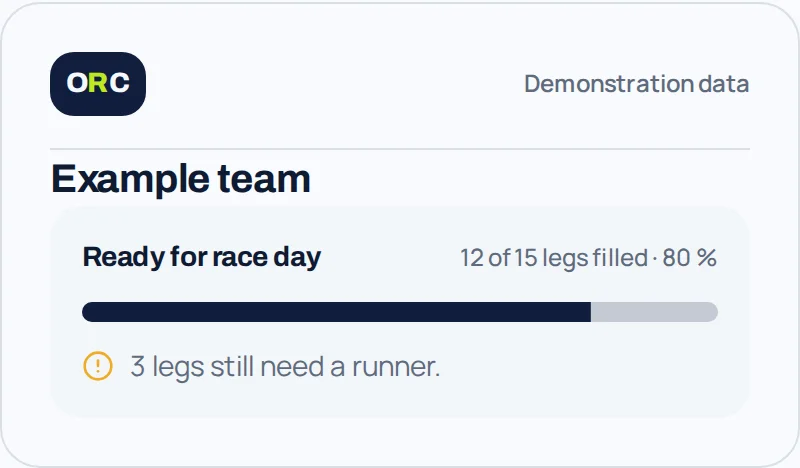
A Sopra Steria team is set up in an official class, with all 15 legs listed and 12 of them filled.
- 03
Open legs are visible
Legs 6, 9 and 13 are still open. Everyone on the team sees exactly what is missing.
- 04
Interest becomes a leg
A colleague asks for leg 9, and the team leader approves it. The line-up updates for the whole team.
- 05
Cost is settled up front
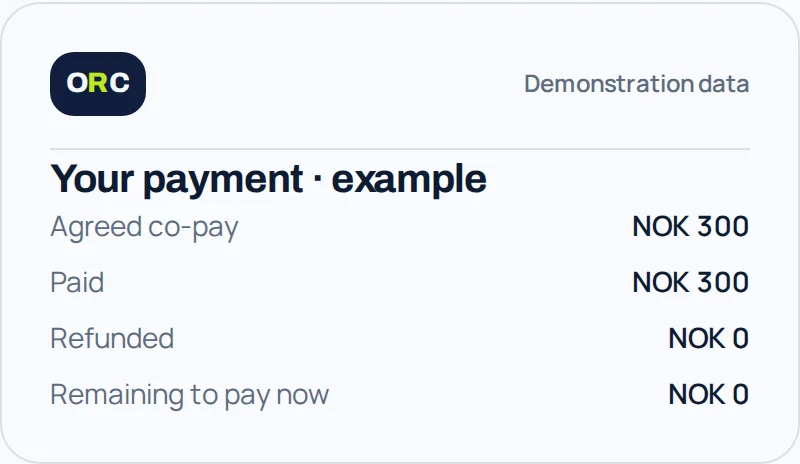
The place costs NOK 450. The company covers NOK 300 and the employee pays NOK 150 — visible before anyone commits.
- 06
Registration and follow-up
The team is registered with the organizer through the channel that race uses, and readiness is tracked until race day.
Illustrative example with demonstration data. Races, classes and places depend on your company and the organizer.
The operating workflow
Six stages, from finding a race to understanding participation afterwards. The races and places available to you depend on your company.
- 01
Discover
Browse the race catalogue and shortlist the races that fit your company and its people.
- 02
Decide
Run a poll and let colleagues give input before the company commits to a race.
- 03
Organize
Set places, allocation model and employee contribution, assign responsibility and build relay teams.
- 04
Register
Handle the company workflow and follow up registration with the organizer through the channel that race uses.
- 05
Participate
Employees and teams see their own status and what remains before the start line.
- 06
Measure
Participation analytics built from the workflow already managed in OfficeRunClub.
Your company can also collect T-shirt orders and manage pickup through the portal.
Sentrumsløpet, Oslo Maraton and Holmenkollstafetten are examples of races you can coordinate. Available races and places depend on your company. These examples are not a live race calendar.
Log in to see your company’s racesFor your company
From scattered coordination to one operational overview
Company race participation usually lives in spreadsheets, inboxes and separate organizer systems. OfficeRunClub keeps the whole workflow in one place, while the company decides what to offer.
Without OfficeRunClub
- Spreadsheets for places and participants
- Email and chat threads for sign-ups
- Manual tracking of who got a place
- Separate organizer systems per race
- Payment and contribution followed up by hand
- Unclear status for employees
With OfficeRunClub
- One race portfolio for the company
- Fair, documented allocation
- Clear status for every employee
- Company contribution and employee copay in one view
- Relay teams and legs coordinated in the portal
- Participation analytics from your own workflow
Fair when demand exceeds places
Most races have fewer places than interested colleagues. Your company chooses how to handle that for each race — collect interest and allocate, draw, or offer places first-come, first-served. Every employee sees a clear status either way.
- Interest
- Employees register interest. The race owner allocates spots manually.
- Draw
- Everyone signed up joins the draw. Winners get an offer with a deadline.
- First come, first served
- Spots are given out continuously as long as there is capacity left.
One platform. Clear responsibility.
Everyone sees what belongs to their role, and nothing more.
Employee
Choose races, register or express interest, and follow your own participation.
Race owner
Manage places, deadlines and participants for the races you are responsible for.
Team leader
Build the relay team, coordinate legs and keep readiness up to date.
Company admin
Manage the company programme, roles and overall oversight.
Interested in using OfficeRunClub?
Tell us how your company coordinates race participation today, and we can walk through the platform together. Your company needs to be set up in OfficeRunClub before employees can access it.
One company layer across many races and organizer systems
Races are run by different organizers on different systems. OfficeRunClub is the company’s layer across them, so the internal workflow stays the same no matter which system a race uses.
- Company
- Employees
- OfficeRunClub
- Races and organizer systems
Registration channels we support
- Organizer integration
- Direct provider integration where it is available for that race.
- Corporate code
- The company code is passed on to employees for organizer sign-up.
- Deeplink
- Employees are sent to the organizer’s own registration page.
- Bulk import
- Participant lists are handed over in one go.
- Manual
- A fallback that always works, whatever the organizer supports.
Which channel applies depends on the race and the organizer. OfficeRunClub does not control organizer systems.
Participation analytics
Measure participation, not workouts.
OfficeRunClub reports on the participation workflow the company already manages here — engagement, registrations, attendance where it is known, contribution, race portfolio and team readiness. No fitness tracking, no wearables, no health data.
Participation analytics
Demonstration data. Not a live company.
Employees engaged
128
+18 vs last season
Confirmed registrations
96
across 7 races
Attendance completed
91%
where results are known
Company contribution
NOK 184,500
this season
Races in portfolio
7
3 upcoming
Relay readiness
12/15
legs filled
Registrations per month
Keep the running community connected
Groups and shared activities keep colleagues in touch between races, and a Strava club can be linked if your group already uses one. OfficeRunClub complements the tools people already use — it is not a replacement for them, and it is not a social network.
Good to know before you start
Who can log in?
Employees of companies set up in OfficeRunClub use their work email. If you are unsure about access, contact support@officerunclub.com.
How are places allocated?
Your company chooses the approach for each race. The race owner can allocate places after collecting interest, use a draw, or offer places on a first-come, first-served basis while capacity remains. Check the information for the race you want to join.
Does getting a place mean I am registered with the organizer?
A place in OfficeRunClub is not, by itself, confirmation from the organizer. Organizer registration follows the arrangements for each race, for example through the race owner or a registration link. The organizer’s confirmation is followed up separately.
What does participation analytics measure?
It measures the company participation workflow handled in OfficeRunClub: engagement, registrations and places, attendance where it is known, company contribution, race portfolio and team readiness. It is not fitness tracking and uses no GPS, wearable or health data.
Who provides the service, and how do we get help?
OfficeRunClub is the service provider. Contact support@officerunclub.com with questions about the service. Read the privacy policy.
How does your company coordinate race participation today?
Tell us how it works for you now — spreadsheets, inbox threads or something else — and we can walk through how OfficeRunClub would fit.
support@officerunclub.comOpens your email app.